What is Verriflo?
Let's cut to the chase: building live video into an education app is a nightmare.
You start with "we just need a live classroom feature" and suddenly you're down a rabbit hole of WebRTC documentation, media server deployments, TURN server configurations, and codec compatibility issues. Three months later, you're still debugging why Safari on iOS randomly freezes.
We've been down that road. Burned the time. Made the mistakes. And we came back with something that actually works.
Verriflo is the live classroom layer you bolt onto your education platform. You call our API, we give you a token, your users get live video. The ugly stuff in between—the servers, the encoding, the network resilience, the cross-device chaos—that's on us.
How It Actually Works
Here's the flow in plain terms:
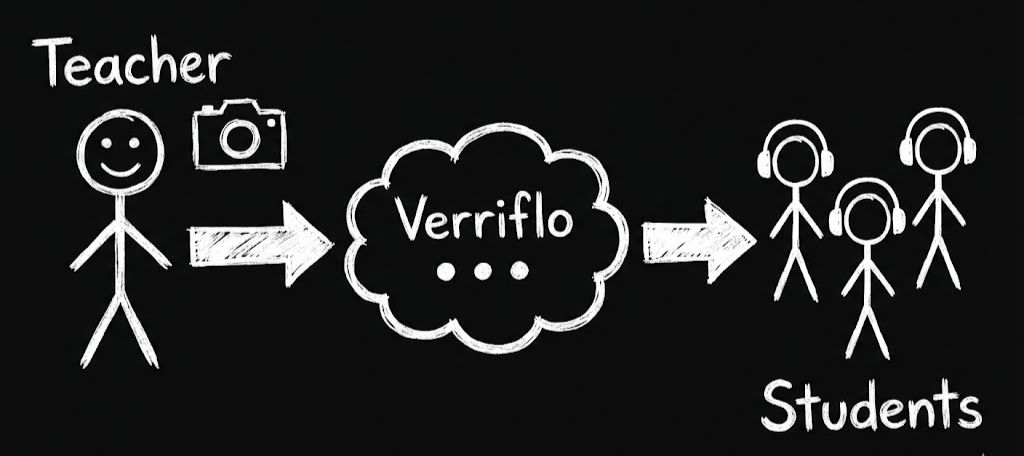
The instructor opens your app and starts a class. Their browser captures video, encodes it, and uploads it to our infrastructure. We take that stream and distribute it to every connected student, optimized for each one's connection quality.
Notice what's not happening: students aren't connecting directly to the instructor. They're connecting to us. That's the key insight that makes scaling possible. One instructor can broadcast to thousands of students without their laptop melting—because they're only uploading once.
The Specific Problem We Solve
Generic video SDKs exist. Why would you use Verriflo instead?
Because we built specifically for the instructor → students dynamic. Not video calls. Not conferencing. Not peer-to-peer chat. One person teaching, many people learning.
This shapes everything:
Roles that make sense. Teachers broadcast and control the room. Students watch and listen. Moderators help manage. You don't have to invent a permission model—ours already matches how classrooms work.
Features that matter for learning. Hand raising. Attendance tracking. One-click recording. Participant management. These aren't bolted-on afterthoughts—they're core to the product.
Reliability over flash. We could add a million features. Instead, we obsess over the stream not freezing. When a student is following a live explanation, nothing else matters if the video stutters. We optimized for that.
Video Quality That Actually Adapts
This is one of those things that sounds simple but isn't.
Student A is on fiber. Student B is on home WiFi with three siblings streaming Netflix. Student C is on 4G from a moving train.
If you send everyone 1080p video, Student C's stream will buffer constantly. If you send everyone 240p to be safe, Student A is watching a pixelated mess when they should be seeing crystal-clear video.
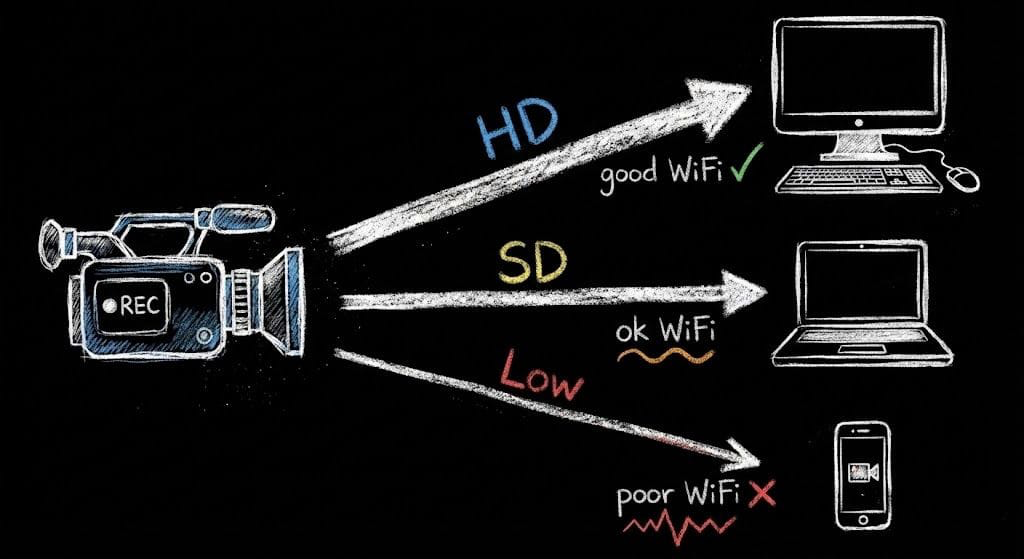
Here's what actually happens: the instructor's browser encodes the video at three quality levels simultaneously. Our servers monitor each student's connection in real-time—packet loss, latency, available bandwidth—and pick the right quality for each person, switching dynamically if conditions change.
Student's connection drops? We switch them to a lower layer instantly. Connection recovers? Back to HD. They see smooth video instead of frozen frames and buffering spinners.
You don't configure this. It runs automatically in every classroom.
Who's This Actually For?
We're not for everyone. Here's who gets the most out of Verriflo:
Online course platforms that run live lectures alongside recorded content. You've already got the course infrastructure—you just need reliable live video without building a media team.
Tutoring marketplaces connecting students with instructors. Whether it's one-on-one sessions or small groups, you need video that works across devices without constant support tickets.
Coaching platforms for fitness, music, languages, test prep—anything taught live. Your instructors aren't technical. The video needs to just work.
EdTech startups that want to ship fast. You're competing against established players. Spending six months on video infrastructure is time you don't have.
Training platforms delivering live professional development. Corporate networks have restrictive firewalls. You need video that punches through them.
If you're building something where one person streams to many people and the quality needs to be solid—that's exactly what we do.
What You Actually Get
Let's be specific:
Platform-Level Features
- REST API: Clean endpoints for creating rooms, generating tokens, managing participants, controlling recordings
- Web Embedding: One iframe URL. Drop it in your app. Done.
- Flutter SDK: Native mobile experience with full feature parity
- Webhooks: Get notified when classes start, end, participants join/leave
- Recording Downloads: Captured automatically, available via API
AI-Powered Services
- AI Tutor: Real-time AI assistant for students during live classes
- AI API (Voice Agent): Conversational AI with text, voice, and image support for your applications
- CDN & Media: Video transcoding, storage, and delivery infrastructure
For Your Instructors
- Camera, microphone, screen share with professional controls
- Real-time view of who's in the room
- Mute or kick disruptive participants
- One-click recording control
- Quality monitoring so they know the stream is healthy
For Your Students
- Video that adapts to their connection automatically
- Works on desktop, tablet, phone—whatever they've got
- Automatic reconnection when networks hiccup
- Consistent interface regardless of how they access the class
The Integration Story
You're probably wondering how much work this actually takes to integrate. Here's the honest answer:
Server-side: You make a single API call with room details and participant info. We return a token.
Client-side: You pass that token to our SDK (mobile) or open our URL in an iframe (web).
That's it. There's no WebRTC library to integrate. No media server to configure. No STUN/TURN infrastructure to maintain.
The API looks like this:
POST https://api.verriflo.com/v1/room/:roomId/join
{
  "participant": {
    "uid": "jane-smith-456",
    "name": "Jane Smith",
    "role": "STUDENT"
  }
}
Response:
{
  "success": true,
  "data": {
    "token": "eyJ...",
    "iframeUrl": "https://live.verriflo.com/iframe/live?token=...",
    "expiresAt": "2024-01-16T19:00:00.000Z"
  }
}
For web: open iframeUrl in an iframe.
For mobile: pass iframeUrl to the Flutter SDK.
Video starts flowing. Our problem from here.
Recording: Capture Now, Replay Later
When recording is enabled, we capture the live stream in real-time. Not "we'll process it later"—real-time.
Recordings are available for download via API within minutes of the class ending. Your students missed the live session? They can catch up.
One catch: recordings are automatically deleted 6 hours after class ends. Download them to your own storage if you need them longer.
This is intentional. Educational recordings often contain faces, names, potentially sensitive classroom discussions. Short retention by default means less data sitting around. You control what happens after you download.
Security, For Real
Not just checkboxes on a compliance form:
- DTLS-SRTP: All media encrypted between clients and our servers
- TLS 1.3: Every API call and signaling connection uses modern encryption
- Scoped tokens: Each token is tied to exactly one room and one identity
- Short-lived: Tokens expire quickly—even if intercepted, they're useless soon after
Your students' faces and voices are going through our servers. We treat that responsibility seriously.
What Happens When Things Break?
Networks break. WiFi drops. LTE hands off between towers. Students walk through dead zones.
Most video: frozen screen, manual page refresh, apologize for missing 30 seconds.
Verriflo: brief "Reconnecting..." message, then back in class. Automatic. Seamless. No refresh needed.
We designed the entire SDK around the assumption that connections will fail. The question isn't "if" but "when" and "how fast can we recover."
For most hiccups, recovery takes under 10 seconds. Often less. Students barely notice.
Next Steps
Enough talking. Let's build something:
- Quick Start — Your first classroom in 5 minutes
- How It Works — Technical deep dive into the infrastructure
- API Reference — Full endpoint documentation
- Flutter SDK — Native mobile integration
Questions? support@verriflo.com. We actually read and reply.